
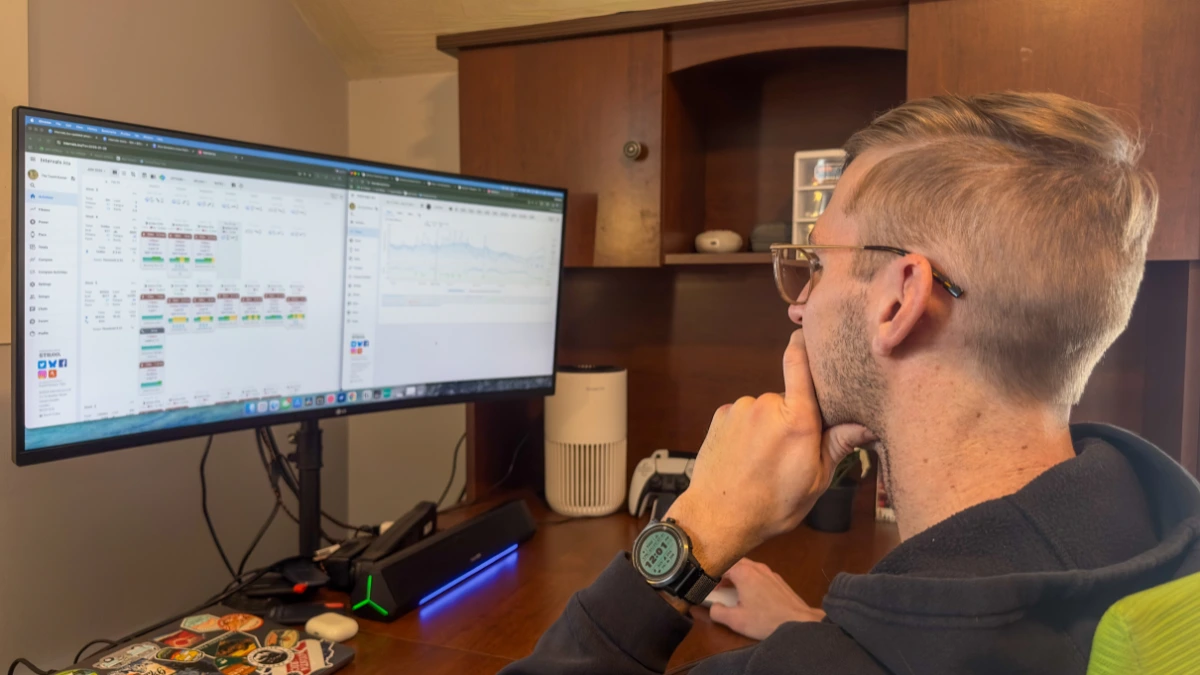
If you want an easy (and free) option to track your workouts and progress, Intervals.icu is a solid option.
There are more expensive options, like TrainingPeaks and Strava. But why use those when you can get an excellent tracker for no money down?
I’ll break down Intervals.icu and its features so you can figure out if it’s for you.
Let’s get into it.
Introduction to Intervals.icu
If you’re an endurance sports fanatic, Intervals.icu is perfect.
Whether running, cycling, or swimming (or all three), Intervals.icu’s interface and tools are perfect for tracking your progress. Especially compared to tools like TrainingPeaks and Strava, which are getting more expensive.

Intervals.icu is a freemium platform. Most features are free, but you can pay to access extras like training plans, integrations, or even coaches.
But you get plenty in the free version:
- Training load and intensity
- Time spent in different heart rate zones
- Fitness chart
- Integrations to automatically sync workouts (Garmin, Strava, etc.)
- Data customization (enter your FTP, HR, and more)
- Managing athletes or more than one person
So, whether you want a simple log of their workouts or want to dive deeper than a scuba diver into your workout information, Intervals is perfect for it.
But let’s dive deeper into the top features so you can see if Intervals is for you.
Overview of Interval’s features for your training activity
As someone who loves data analysis, I was excited to see what Intervals.icu had to offer.
I was not disappointed! This platform has impressive features that make monitoring, analyzing, and planning my workouts easy.
It has basic analytics, like an aggregated calendar view, and more advanced tools for automated tests and personalized training plans. On top of that, it is compatible with other apps, so I can easily keep track of my data wherever I go.
With all these features, intervals.icu will become the next go-to tool for serious athletes!
Intuitive dashboard
A simple dashboard design is a blessing when tracking your workouts.
Getting lost in a million menus and not finding what you’re looking for is a frustrating experience. And Intervals understands that perfectly.
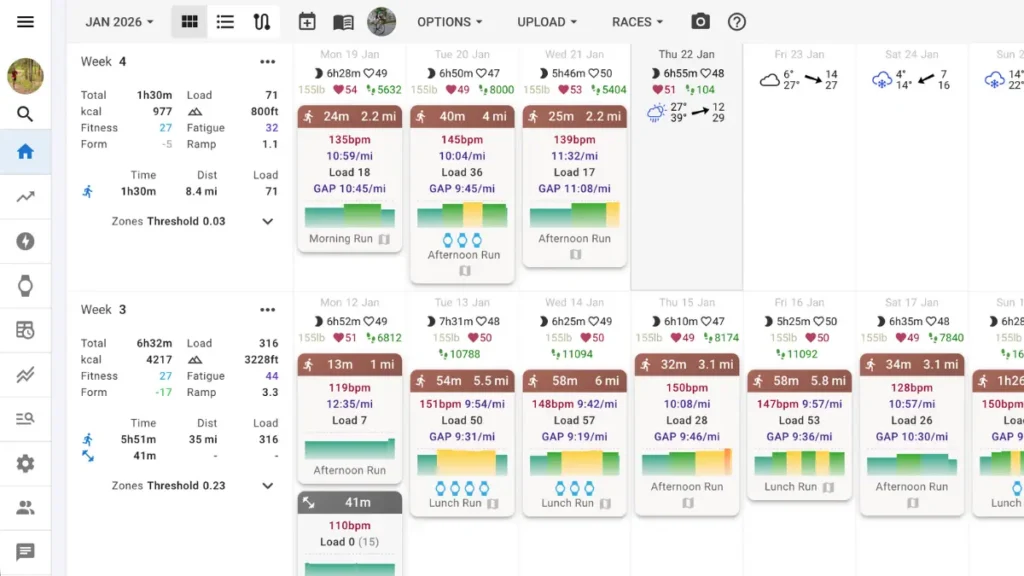
The moment you log in, you have a simple month calendar to view your previous workouts day by day. Or, you can easily add a workout, a helpful feature.
From the calendar, you get a quick view of your training:
- Duration
- Average HR and max HR
- Pace or Speed
- Training load
- Power zones
- Effort
- Cadence
If you want more info on a single workout, click on the workout to see a detailed view.
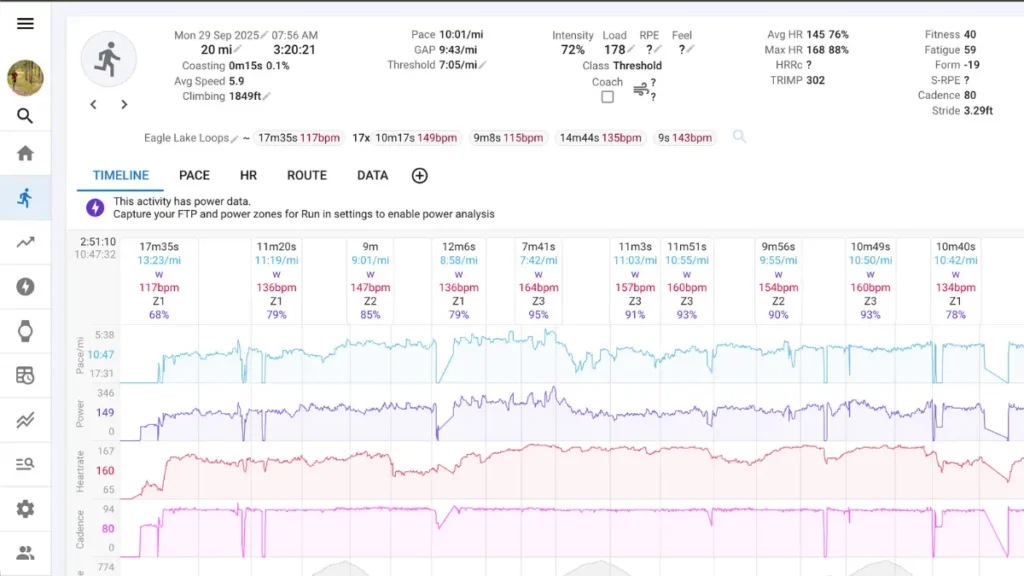
But that’s only part of you get here. On the left side, you have your choice of other menus.
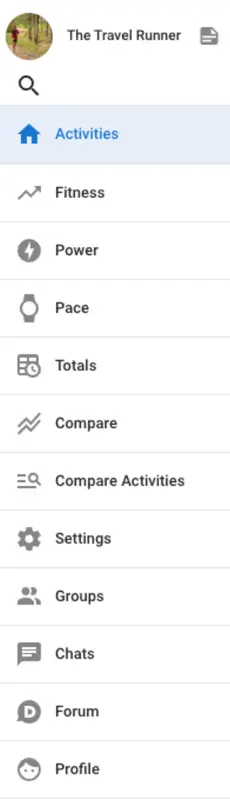
We’ll get into a few more of these tools in a minute, but everything is simple and easy to find.
And when you’re tracking workouts, you don’t have time to fumble with menus and gadgets.
Advanced data analysis
Worry not, data nerds.
There’s plenty for us here, too! And Intervals dives in deep to give you everything it can.
For example, a great way to track your training changes across time is with its Fitness Chart.
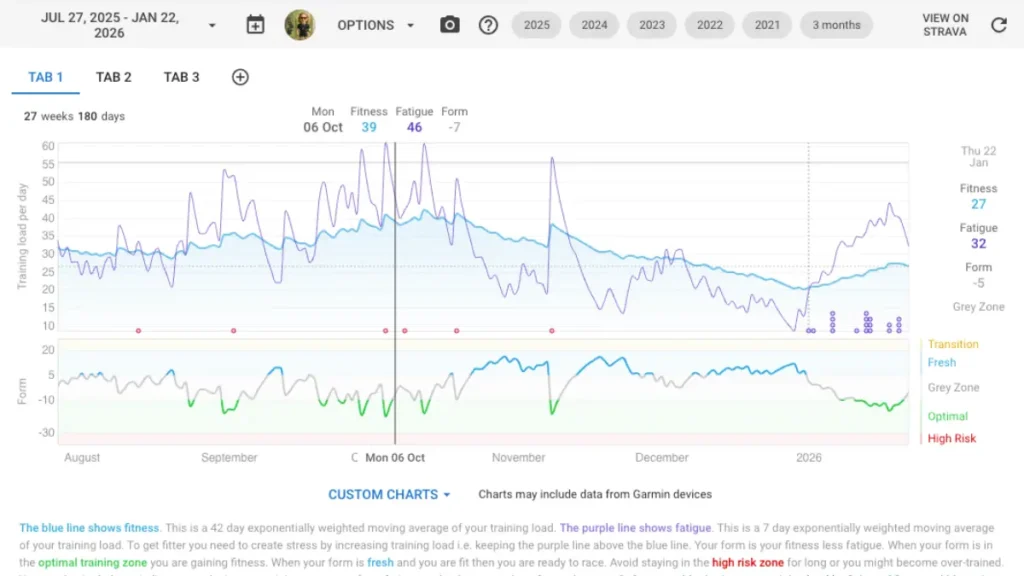
At a glance, you can get your current aerobic fitness level, fatigue, and form, so you know when to push and when to back off in the future. Plus, you get other great metrics like eFTP (estimated FTP).
While it’s not a direct indicator of your training status, it is a great way to know how your training is going.
If you’re a cyclist, you also have options within the Power menu to track it over a season.

Also, under the Totals menu, you can view your entire training and some metrics like:
- Activities
- Distance
- Time
- Load
- Heart rate zone percentages
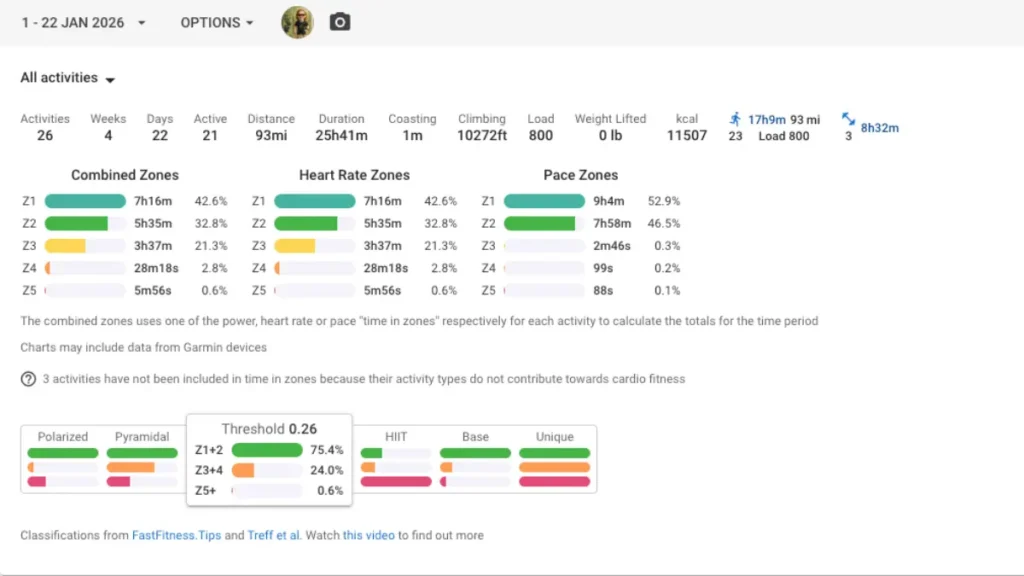
So at a quick glance, you get a macro view of your training (like how much time you spent in heart rate zone 2, 3, or others). And with this info, you can quickly see your personal targets vs. your goal targets and if you need to consider adapting.
And those are just some of the top data analysis features. Intervals also includes:
- Activity power charts
- Decoupling charts
- Cumulative heart rate time
- Ride intervals tables
- Comparison menu
- Custom charts

Custom heart rate zones
It’s not just heart rate zones (although there’s that, too).
You can create an entire athlete profile and adjust it based on the activity. Heart rate, power settings, and even your training gear!
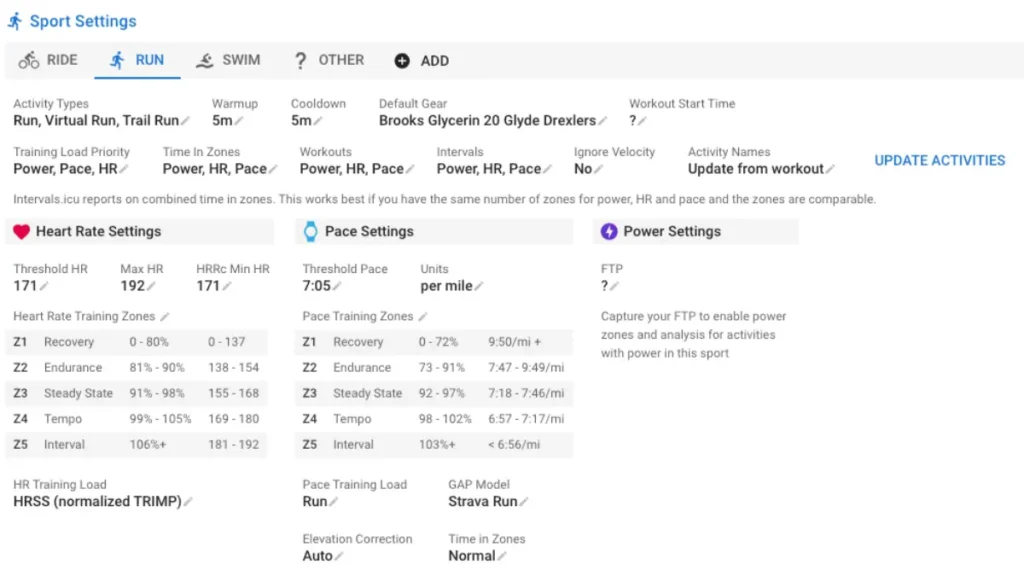
Setting up this information gives you a more accurate view of your workouts and how they affect you personally.
And that’s something all the top workout services offer. So good on Intervals for including this key feature.
Personalized Training Plans
Someone who wants a nice training plan built right into their workout tool?
Lucky for you, Intervals has those, too! And there are plenty for you to choose from!
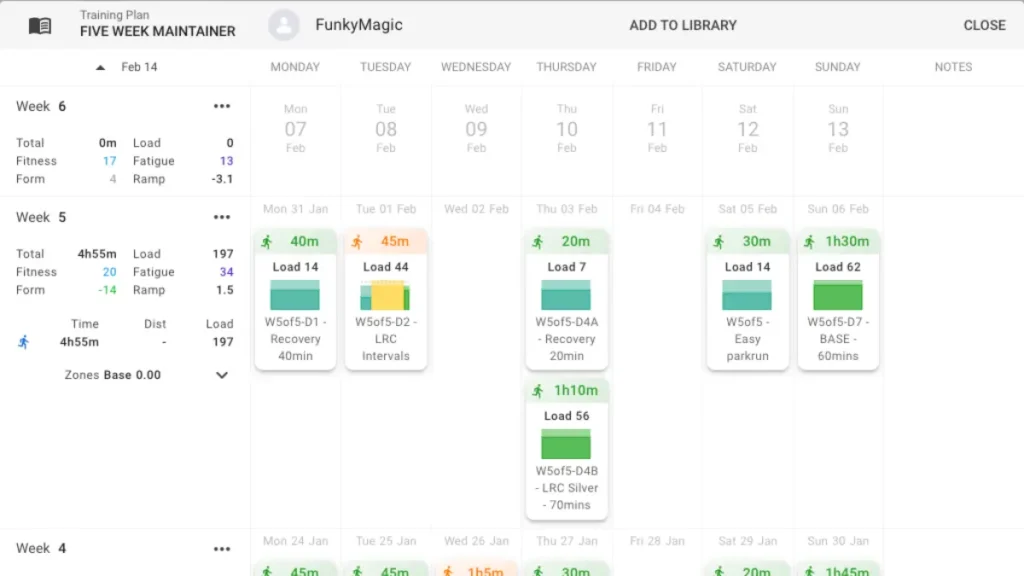
Pick the number of hours each week, how long the plan should last, and what activity you’ll do. Then you have a vast selection of training plans to browse.
Then simply choose the training plan and view more information about it.
Or you can build your own training plan if you’re confident enough. With simple features to add the distance, time, and zones, you can build a complete training plan that suits your event in no time.
Community
A great way to keep yourself motivated to run is the community offers.
And Intervals has Groups and a Forum where you can connect, ask questions, and develop connections with other users! It even breaks the groups by age groups (so if you’re in the master division, you’ll find friends here).
While it doesn’t have the social level of Strava, sometimes you’re not looking for that.
And Intervals has a nice in-between to help you out.
Pros and Cons of Intervals.icu

As with everything, there are always pros and cons.
So, let’s dive into some of the pros and cons of Intervals.
Pros of using Intervals
- Detailed data tracking – Track various metrics such as training load, heart rate, power, pace, and more.
- Personalized – You get many tools to customize the platform to represent you and your training.
- Device compatibility – Whether it’s a phone, tablet, or computer, Intervals still looks excellent.
- Easy to use – Casual and serious runners alike will find the dashboard easy to use.
Cons of using Intervals
- Small backing – Intervals is more likely to have errors than software like Strava or TrainingPeaks simply because of the financial support.
- Freemium model – If you’re looking for a completely free option, then you may be turned off by the cost of the premium add-ons.
- Learning curve – While the dashboard is simple, if you’re used to other tools, there will be a learning curve for you to get around.
Are you ready to track and analyze your training with Intervals.icu?
While your needs will vary, Intervals has something for every type of runner.
And while Strava and TrainingPeaks continue to increase their prices, endurance athletes are looking for other websites and apps to track how hard they’re working.
And Intervals.icu is one you shouldn’t miss.
But if you want other alternatives to the popular workout services, I recommend checking out this post of the top TrainingPeaks alternatives.
And I want to hear from you! If you’ve tried out Intervals.icu, let me know what you think. Or if there’s anything I should have covered, let me know so I can!



Leave a Reply to carnivals Cancel reply